This chapter provides information on the flow and procedures for trial operation and convenient functions to use during trial operation.
7.1 Flow of Trial Operation
7.1.1 Flow of Trial Operation for Rotary Servomotors
The procedure for trial operation is given below.
|
Step |
Meaning |
|
1 |
Installation |
|
2 |
Wiring and Connections |
|
3 |
Confirmations before Trial Operation |
|
4 |
Power ON |
|
5 |
Resetting the Absolute Encoder |
7.2 Inspections and Confirmations before Trial Operation
To ensure safe and correct trial operation, check the following items before you start trial operation.
• Make sure that the servo driver and Servomotor are installed, wired, and connected correctly.
• Make sure that the correct power supply voltage is supplied to the servo driver.
• Make sure that there are no loose parts in the Servomotor mounting.
• If you are using a Servomotor with an Oil Seal, make sure that the oil seal is not damaged.
Also make sure that oil has been applied.
• If you are performing trial operation on a Servomotor that has been stored for a long period of time, make sure that all Servomotor inspection and maintenance procedures have been completed.
Refer to the manual for your Servomotor for Servomotor maintenance and inspection information.
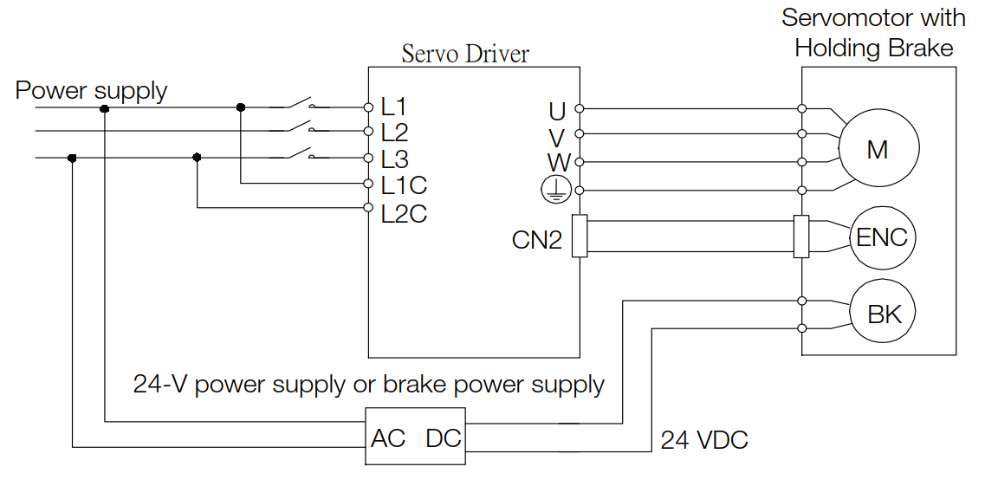
• If you are using a Servomotor with a Holding Brake, make sure that the brake is released in advance. To release the brake, you must apply the specified voltage of 24 VDC to the brake.
A circuit example for trial operation is provided below.
7.3 Trial Operation for the Servomotor without a Load
You use jogging for trial operation of the Servomotor without a load.
Jogging is used to check the operation of the Servomotor without connecting the servo driver to the host controller. The Servomotor is moved at the preset jogging speed.
|
|
|
● During jogging, the overtravel function is disabled. Consider the range of motion of your machine when you jog the Servomotor. |
 CAUTION
7.3.1 Preparations
Always check the following before you execute jogging.
• The parameters must not be write prohibited.
• The main circuit power supply must be ON.
• There must be no alarms.
• There must be no hard wire base block (HWBB).
• The servo must be OFF.
• The jogging speed must be set considering the operating range of the machine. The jogging speed is set with the following parameters.
*1: STO is an optional function.
Rotary Servomotors
|
Pn304 |
|
Torque |
|||||||
|
Setup Range |
Setup Unit |
default setting |
When Enabled |
Classification |
|||||
|
0~10000 |
1 min-1 (RPM) |
500 |
immediately |
Setup |
|||||
|
Pn305 |
|
||||||||
|
Setup Range |
Setup Unit |
default setting |
When Enabled |
Classification |
|||||
|
0~10000 |
1 ms |
0 |
immediately |
Setup |
|||||
|
Pn306 |
|
||||||||
|
Setup Range |
Setup Unit |
default setting |
When Enabled |
Classification |
|||||
|
0~10000 |
1 ms |
0 |
immediately |
Setup |
|||||
7.3.2 Applicable Tools
The following table lists the tools that you can use to perform jogging
|
Tool |
FA No./Function Name |
|
Panel Operator |
FA002 |
|
ProTuner |
Operation – Jog |

Tip: press ← → to switch chapters, Ctrl+K to search